Advanced Image Compressor
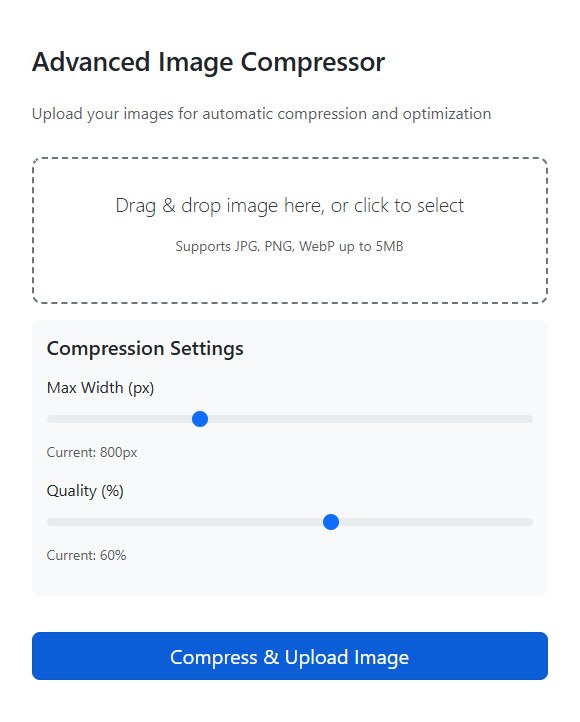
This is a comprehensive web-based image compression tool that allows users to upload, compress, and optimize images with a modern, user-friendly interface. The solution combines both frontend and backend functionality to provide a complete image processing experience.
Key Features
Frontend Interface
- Modern Bootstrap Design: Responsive layout that works on all devices
- Drag & Drop Functionality: Intuitive file uploading with visual feedback
- Image Preview: Real-time preview of selected images before compression
- Compression Controls: Adjustable settings for maximum width and quality
- Progress Tracking: Visual progress bar during upload and processing
- File Information Display: Shows file details (name, size, type)
- Error Handling: Comprehensive error messages and validation
- Loading States: Visual feedback during processing operations
Backend Processing (PHP)
- Enhanced Security: Multiple validation layers to prevent malicious uploads
- File Type Validation: Only accepts JPG, PNG, and WebP formats
- Size Limiting: 5MB maximum file size restriction
- Secure File Handling: Generated unique filenames to prevent conflicts
- Image Optimization: Automatic resizing and compression
- Error Recovery: Proper cleanup of temporary files on failure
- Detailed Results: Shows original vs compressed file sizes and percentage reduction
Technical Implementation
Security Measures
- MIME type validation to prevent executable file uploads
- File extension checking to ensure only image formats are processed
- File size limitations to prevent server overload
- Secure filename generation using UUIDs to prevent directory traversal
- Input sanitization and error handling
- Proper file movement with validation checks
User Experience Features
- Interactive Sliders: Real-time adjustment of compression parameters
- Visual Feedback: Drag-over effects and loading indicators
- Responsive Design: Works on mobile, tablet, and desktop devices
- Clear Results Display: Shows compression statistics and final image
- Accessibility: Font Awesome icons and semantic HTML structure
How It Works
- User Interaction: Select or drag an image file
- Validation: System checks file type, size, and format
- Preview: Shows selected image and file information
- Compression Settings: Adjust maximum width and quality levels
- Processing: Uploads file to server for compression
- Results: Displays before/after comparison and download options
Benefits
For Users
- Easy to Use: Simple interface with drag-and-drop functionality
- Customizable: Adjustable compression settings for different needs
- Fast Processing: Efficient compression algorithms
- Safe: Built-in security measures protect against malicious uploads
- Informative: Detailed compression statistics and results
For Developers
- Secure Foundation: Production-ready security practices
- Modular Design: Easy to extend or modify
- Well Documented: Clear code structure and comments
- Cross-Platform: Works across different browsers and devices
- Error Resilient: Handles various error conditions gracefully
Requirements
Server Requirements
- PHP 7.0+ with GD extension enabled
- Apache or Nginx web server
- Write permissions to upload directory
- 5MB+ available disk space for uploads
Browser Compatibility
- Modern browsers (Chrome, Firefox, Safari, Edge)
- JavaScript enabled
- CSS3 support
Usage Instructions
- Select Image: Click the upload area or drag an image file
- Adjust Settings: Use sliders to set maximum width and quality
- Compress: Click the "Compress & Upload Image" button
- View Results: See compression statistics and compressed image
- Download: Access the optimized image from the results
This solution provides a complete, secure, and user-friendly image compression experience that balances ease of use with professional-grade functionality.
Author: Ameer Baksh
Upload Date: August 8, 2025
Last Update: September 3, 2025
Version: 1.0.2
Script Type: PHP
View DemoVersion 1.0.2 (Latest)
Date: 03/09/2025
Security Improvements
- Enhanced file validation with multiple checks
- File size limitation (7MB max)
- Added comprehensive MIME type verification
- Improved file extension filtering
- Better error recovery mechanisms
- Additional input sanitization
Stability Enhancements
- Added timeout handling for network requests
- Improved error recovery for failed uploads
- Better memory management for large files
- Enhanced AJAX error handling
- Added graceful degradation for unsupported features
UI/UX Improvements
- Added loading spinner during processing
- Improved responsive behavior on small screens
- Better visual hierarchy and spacing
- Enhanced accessibility features
- More intuitive form feedback
Version 1.0.1
Date: 15/08/2025
Major Updates
-
UI/UX Improvements:
- Added Font Awesome icons for better visual cues
- Enhanced drag & drop visual feedback
- Better organized compression controls
- Improved result display with colored alerts
- Added file information display section
-
Advanced Compression Controls:
- Interactive sliders for maximum width (300-1920px)
- Quality adjustment slider (10-95%)
- Real-time display of current slider values
- Better organized control panel with card styling
-
Enhanced Error Handling:
- More descriptive error messages
- Visual error indicators with icons
- Network error handling
- File validation before processing
- Loading states during processing
-
Performance Improvements:
- Optimized JavaScript event handling
- Better progress tracking
- Improved form submission handling
- Enhanced file validation logic
Bug Fixes
- Fixed progress bar reset issue after successful upload
- Corrected file size calculation display
- Resolved drag-over event conflicts
- Fixed button state management during processing
Version 1.0.0 (Original Release)
Date: 08/08/2025
Features Added
- Complete drag & drop image upload interface
- Real-time image preview functionality
- Bootstrap 5 responsive design
- Progress bar during file upload
- Basic image compression with resize and quality settings
- Server-side PHP processing with security validation
- Original vs compressed file size comparison
- Mobile-friendly responsive design
Security Enhancements
- File type validation (JPG, PNG, WebP only)
- File size limitation (5MB max)
- Secure filename generation
- MIME type verification
- Error handling and cleanup procedures